
TX Text Control Server for ASP.NET (incl. Windows Forms) 14.0 ships with a new class that allows documents to be easily merged. A template is a collection of content, including variable merge fields. A merge field is a named region in a document that is possibly formatted. During the compilation process, the actual field values are substituted for the corresponding text fields. These templates can be created using MS Word, OpenOffice or the new shipped TX Template Designer.
The MailMerge class is a .NET component that can be easily created dynamically or dropped on a web or Windows form. The documentation explain in detail how to create such an application in very easy steps. In the remainder of this blog post, I would like to explain the advantages of this component.
TX Text Control .NET for Windows Forms contains a collection for the TextFields or ApplicationFields, which are compatible to the fields of MS Word. All steps that are necessary to merge a template using TX Text Control .NET for Windows Forms are encapsulated in this new component.
All you have to do is to load a template, pass the merge data and to save the merged document.
mailMerge1.LoadTemplate(Server.MapPath("template.docx"), TXTextControl.DocumentServer.FileFormat.WordprocessingML);
mailMerge1.Merge(mergeData, true);
mailMerge1.SaveDocument(Server.MapPath("results.pdf"), TXTextControl.StreamType.AdobePDF, saveSettings);
The MailMerge component matches the contained merge field names automatically with the database column names and merges the template with the appropriate data automatically. For each data row in the passed data table, a document is created. These documents can be saved separately or they can be merged into one document that can be saved at once.
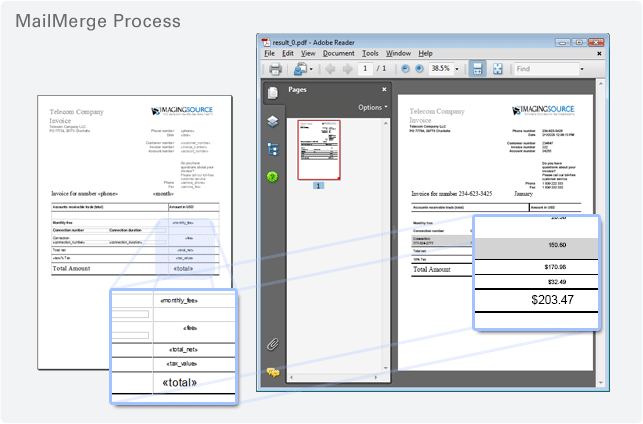
After each data row, an event is fired that enables you to save the current document. The following illustration shows the template with the merge fields and the ready merged PDF document at the right:
The MailMerge component contains some more nice features. I will be explaining these in my next blog entries. One of these interesting features are repeating blocks. These blocks allow you to define an area in your template that should be repeated based on the number of data rows in a separately passed data object.
Try out the new MailMerge class yourself by downloading a TX Text Control Server for ASP.NET (incl. Windows Forms) trial version now:
TX Text Control .NET Server for ASP.NETFeel free to contact me, if you would like to discuss the possibilities.
