
When you search for ASP.NET WYSIWYG editors on the Internet, you find loads of plain HTML-based editors. They are typically deployed in web-based content management systems, in which they are used to edit HTML snippets. All of them are based on existing browser technology:
- Internet Explorer offers the DHTML control to edit the HTML
- Firefox has Midas, the pendant to the MS DHTML control
The advantage of this technology is that the browser does not require a plug-in or an ActiveX control. However, using this technology, it is not possible to modify complete word processing documents, such as MS Word or RTF files. Furthermore, it is not possible to edit, nor add headers and footers, text frames and other such sophisticated features.
Using TX Text Control Server for ASP.NET (incl. Windows Forms) and the shipped BrowserTextControl component, you can build a complete word processing application for Internet Explorer. The BrowserTextControl can be encapsulated in a user control assembly, including the integrated button bar, status bar and the powerful vertical and horizontal ruler bars of TX Text Control. This technology offers true WYSIWYG and a real page view of the document.
The screenshot below illustrates an advanced sample application that runs on our test server. As you can see, TX Text Control Server for ASP.NET (incl. Windows Forms) is shipped with ready-to-use, localizable dialog boxes for nearly all settings. In the screenshot, you can see the paragraph dialog box that enables you to modify all possible settings of the current paragraph.
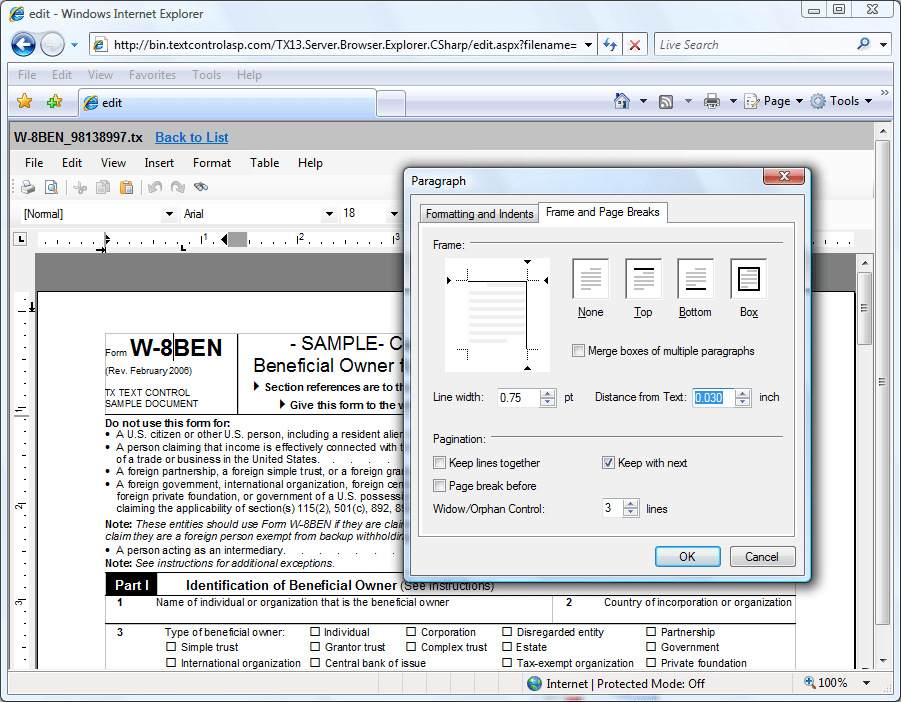
Due to the outstanding text rendering engine of TX Text Control, the display of the text is exactly the same as on the printed page. If you try other components, you will soon notice that this is mostly not the case.
What is Going on Behind the Scenes?
The BrowserTextControl is a .NET assembly that is downloaded into a dedicated folder of the .NET Framework: the download cache. This folder is similar to the Downloaded Program Files folder, known from older ActiveX days. From there, the assembly is loaded and displayed in Internet Explorer.
The most common application for this component is to modify documents that are stored on a server. Centralizing document creation and manipulation processes to a central server, enables enterprises and governments to lower the cost of their document operations. Documents are no longer stored redundantly on every local client machine.
TX Text Control Server for ASP.NET (incl. Windows Forms) uses .NET remoting to load and save the documents from and to the server without a server round trip. The file IO processes are implemented into TX Text Control Server for ASP.NET (incl. Windows Forms) and can be used out of the box.
Typically, the BrowserTextControl is used in combination with the ServerTextControl class which is part of TX Text Control Server for ASP.NET (incl. Windows Forms) as well. This component is able to create or modify documents server-side without being visible. This class can be used in a web service or the code-behind of your ASP.NET web application.
You can test the above mentioned sample yourself:
Please feel free to contact our engineers to discuss further possibilities of this amazing technology. We would be really glad to talk to you.
