
Simple Object Access Protocol or SOAP is a protocol for the interaction of different applications, authored in different languages and running on different platforms. Being an HTTP based, loosely coupled protocol that uses XML as its payload for sending and receiving messages, it is ideally suited for deployment in decentralized, distributed applications that communicate over the Internet.
For the first time, the principles of SOAP have been applied to a TX Text Control Server for ASP.NET (incl. Windows Forms) application.
TX Text Control .NET for Windows Forms and SOAP
One of the key areas of TX Text Control Server for ASP.NET (incl. Windows Forms)'s deployment, lies in the conversion of word processing documents from one file format to another. By building a TX Text Control Server for ASP.NET (incl. Windows Forms) based document conversion application that exposes its interface via a SOAP interface, we are able to offer document conversion services to a disparate set of programming languages and operating systems.
Converting with TX Text Control .NET for Windows Forms on Linux
For example, even though the TX Text Control Blog runs on a Linux server, we can still use TX Text Control to convert blog entries into PDF, DOC or RTF.
The TX Text Control Blog invokes a method of a TX Text Control .NET for Windows Forms based conversion application via a SOAP interface, running on a separate server in a different country. The method is passed valid XHTML from the TX Text Control Blog's database, along with the required file format (in this case PDF, RTF or DOC).
On receiving the request, TX Text Control Server for ASP.NET (incl. Windows Forms) converts the XHTML data into the required file format and returns a binary data stream, via SOAP, to the TX Text Control Blog. On receiving the data stream, the blog offers the file for download to the end-user.
This process is illustrated in the following diagram:
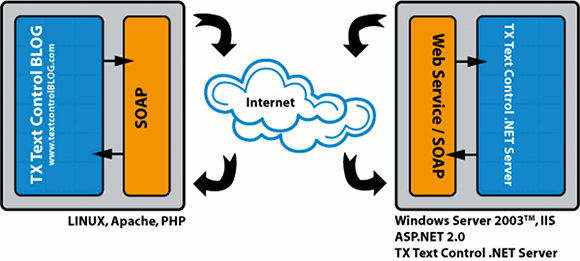
Remember, the application that calls the web service can be running on any operating system, written in any programming language - the only requirement being that the operating system and/or programming language supports SOAP calls.
Advantages of SOAP Based Document Conversion
- Support for very wide range of operating systems and programming languages.
- SOAP is a standardized and open protocol.
- Centralized application structure, thus reducing maintenance.
- Only one license is required for an unlimited number of client applications.
- Offer all authorized parties comprehensive and easy-to-deploy document conversion services.
- Quickly and effortlessly convert documents in batches or on-the-fly.
- Generate print ready document on demand with data from disparate databases and XML files.
Try It out
At the bottom of every blog entry, on the blog entry's permalink page, you will see the following logo:
If you click on this logo, you will be taken to the blog entry's conversion page. From here, you can convert the blog entry to PDF, RTF or DOC.
Need Support? Call Me!
If you need any help getting started with TX Text Control .NET for Windows Forms or have any questions about this SOAP based conversion application, please get in contact with me. I am only too happy to assist you with all matters relating to TX Text Control .NET for Windows Forms.
