
This blog entry contains the main text of a white paper that we have just released. It discusses how TX Text Control is ideally suited to developing mail merge applications. You can download the white paper in its entirety directly below (as a PDF), or read the full text here in the blog.



Document Generation
Document generation is an integral part of most business processes. Letters are written, invoices generated and sales reports created.
Typically, such documents are very similar in nature; they are mainly generated from a static, pre-formatted template and then populated with data.
In some causes, the data population process can be fully automated; in others, there must be some human intervention and manual processing.
Creating Documents Automatically
The term mail merge describes the creation of multiple documents from a single template, combined with data from a structured data source, such as a database table or an XML file.
Today, the usage of this term has been expanded to include automatic document creation processes, such as:
- Electronic procurement
- Report creation
- Online invoicing
All of these processes are based on standardized documents that must be personalized depending upon the current data set.
A template consists of a number of text blocks and an enterprise-wide design that enforces consistency. Additionally, these templates contain text fields or merge fields that can be populated with content from various data sources (XML, databases etc).
Typical Application: Invoicing
At a bare minimum, an invoice consists of the following:
- Name and billing address of addressee
- Company's name and address, including corporate logo
- Product information (part number, name, description, item price, quantity etc)
- Shipping costs, sales tax and total amount
- Some text blocks (bank details, payment terms etc.)
An invoicing application can be created in different ways: As most of this data can be automated or calculated, the end user should be able to simply select the addressee, the product information, their quantity and enter terms of payments.
Using this information, the document can be created. The text fields in the template are merged with the appropriate data and the current pricing information is retrieved from a specific database.
Manual Post-processing?
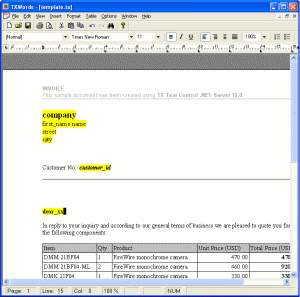
An invoicing application or an invoicing module in business software can display the finished, merged document to the end user. The application might allow the end user to make changes to the document, using a WYSIWYG editor interface.
However, this option should be used with caution, as these modifications may break the corporate identity and enterprise wide consistency of business documents.
Additionally, changes cannot be saved for post-processes, such as sales report generation or statistical analysis.
To analyze business quotations for instance, the data should be stored in a database and not be embedded in the document.
It is better to create documents on demand, based on the current data and the template. The final document is presented to the end-user, thus allowing him/her to check its validity.
Mail Merge - Ideally Suited to TX Text Control
TX Text Control offers a broad palette of mail merge functions, which makes the development of complex mail merge applications very simple. It ships, for example, with TX Template Designer, an application to create formatted templates. The feature set of TX Text Control allows developers to create their own template designers. The source code for the shipped template designer is included.
TX Template Designer enables developers or template designers to create highly formatted templates within a matter of minutes.
Using TX Text Control, the text fields can be accessed in a very easy way. After loading the template document into TX Text Control, the fields can be iterated through in a loop. The following C# code loops through all fields and replaces the text:
foreach (TXTextControl.TextFieldcurField in tx1.TextFields
{
    curField.Text = "Text";
}
Every element of the document is accessible from program code, so that any kind of logic can be applied: From conditional fields that are merged based on specific programmed business logic, all the way to dynamic formatting options.
TX Text Control supports all kinds of databases and can be merged with data from various sources into one template. This enables developers to assemble complex documents, such as sales reports where data comes from disparate databases.
Server-side Mail Merge
The TX Text Control product family offers components for all scenarios and architectures in which word processing is a part. A common trend in business applications is to centralize document creation processes. TX Text Control Server for ASP.NET (incl. Windows Forms) has been specifically developed to create or modify documents server-side and offers its flexibility to all server-side ASP.NET applications.
TX Text Control allows developers to centralize the creation of documents in all supported formats (PDF, DOC, RTF etc.) on demand.
One of the most important aspects during the development of TX Text Control Server for ASP.NET (incl. Windows Forms) was the speed at which applications built on this technology platform execute. It has been built from scratch to create documents in batch processes at the maximum possible speed.
TX Text Control gives you a powerful set of tools to create professional, fast and flexible mail merge applications.
Talk to a TX Text Control Support Engineer
If you need any help getting started with TX Text Control Server for ASP.NET (incl. Windows Forms) or have any questions about this white paper, please get in contact with me. I am only too happy to assist you with all matters relating to TX Text Control.
